1
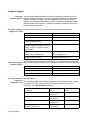
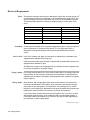
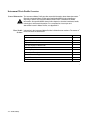
To Reach Technical We strongly encourage you to visit our Web site for answers to frequently asked
Support Through questions and for more information about our products. You can also order technical
the Internet documents or an index of available documents and have them faxed or e-mailed to
you through our site. The Applied Biosystems Web site address is
http://www.appliedbiosystems.com/techsupp
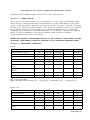
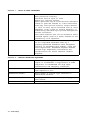
To submit technical questions from North America or Europe:
Step
Action
1
Access the Applied Biosystems Technical Support Web site.
2
Under the Troubleshooting heading, click Support Request Forms, then select the
relevant support region for the product area of interest.
3
Enter the requested information and your question in the displayed form, then click
Ask Us RIGHT NOW (blue button with yellow text).
4
Enter the required information in the next form (if you have not already done so),
then click Ask Us RIGHT NOW.
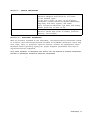
You will receive an e-mail reply to your question from one of our technical experts
within 24 to 48 hours.
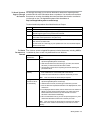
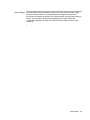
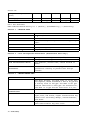
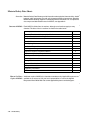
To Obtain Free, 24-hour access to Applied Biosystems technical documents, including MSDSs,
Documents on is available by fax or e-mail or by download from our Web site.
Demand
To order
documents...
Then...
by index number
a. Access the Applied Biosystems Technical Support Web site at
http://www.appliedbiosystems.com/techsupp
b. Click the Index link for the document type you want, then find the
document you want and record the index number.
c. Use the index number when requesting documents following the
procedures below.
by phone for fax
delivery
a. From the U.S. or Canada, call 1-800-487-6809, or
from outside the U.S. and Canada, call 1-858-712-0317.
b. Follow the voice instructions to order the documents you want.
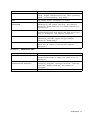
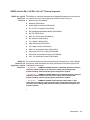
Note
through the
Internet for fax or
e-mail delivery
There is a limit of five documents per request.
a. Access the Applied Biosystems Technical Support Web site at
http://www.appliedbiosystems.com/techsupp
b. Under Resource Libraries, click the type of document you want.
c. Enter or select the requested information in the displayed form, then
click Search.
d. In the displayed search results, select a check box for the method of
delivery for each document that matches your criteria, then click
Deliver Selected Documents Now (or click the PDF icon for the
document to download it immediately).
e. Fill in the information form (if you have not previously done so), then
click Deliver Selected Documents Now to submit your order.
Note There is a limit of five documents per request for fax delivery
but no limit on the number of documents you can order for e-mail
delivery.
Site Preparation 1-5