1
Part D: Quadratic Equations
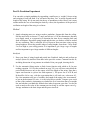
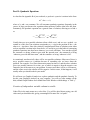
As described in Appendix B of your textbook, a quadratic equation is written in the form
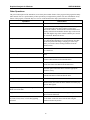
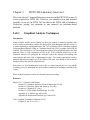
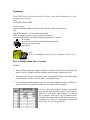
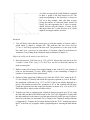
ax2 + bx + c = 0,
where a, b, and c are constants. We will encounter quadratic equations frequently in the
course, in large part because the equations about motion of bodies often have this form.
Fortunately, the quadratic equation has a general form of solution, allowing us to find x
as
x=
− b ± b 2 − 4ac − b
=
±
2a
2a
b 2 − 4ac
.
2a
Usually there are two possible solutions (often called roots), and we use a symbol ± to
remind us of this fact. One solution corresponds to a + sign at the position of the ±, the
other to a - sign there. Since this relatively straightforward form of solution exists when
such an equation is written in the form above, it is useful to get in the habit of rearranging
quadratic equations into that form whenever you work with them. You can then regard
the constant a as being ‘whatever goes with the squared term’, the constant b as being
‘whatever goes with the linear term’, and the constant c as being ‘whatever is left’.
As mentioned, mathematically there will be two possible solutions. Often one of these is
not a possible answer to a problem because of something else we know about the
problem. For example, if we know that motion started at time t=0, and the above solution
gives two possible answers for a time, one of which is negative, then the negative root
cannot be part of the answer to your problem. In some cases there will be no real answer,
and the square root in the solution will be negative. In this course, if that happens, it will
usually mean you should recheck your math!
We will now use Graphical Analysis to explore quadratics and the quadratic formula. To
do this, start Graphical Analysis on your computer. You will see (after turning off the
hint) a blank Graph Window and a blank Data Table Window with headings “x” and “y”.
Creation of independent variable column in a table
Under File in the main menu area, select New. You will be asked about saving your old
values and you should do this, giving a meaningful file name like “ex1partb”.