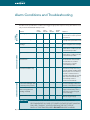
1
Understanding the Controls and Front Panel (continued)
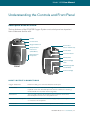
Control Panel Features
The ECLIPSE displays important operating information using the icons, numbers and
visual indicators on the control panel. This section will help you understand these features.
No Smoking Icon
ON/OFF Button
ON/OFF Indicator (Green)
Alert Indicator (Yellow )
Flow Rate Setting (2 Digits )
(Green)
Alarm Indicator (Red )
6. 000
Increase Flow Rate Button
Decrease Flow Rate Button
Power Cartridge Status
Gauge (Green )
External Power Present
Indicator (Green )
Pulse Flow Mode
Indicator (Green )
Flow Mode Button
12 | ECLIPSE TM Model 1000 User Manual