1
6.4 Camera
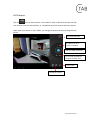
Tap the
icon to open camera. Your tablet is built in 2M front camera and 2M
rear camera. You can take a photo, or a video both by front camera and rear camera.
Note: After you power on your tablet, you can go to camera directly by drag the lock
to left.
To view photos
To select Front/
back camera
Tab to take a photo
Set white balance,
Scene mode, etc.
Pan-shot
Camera switch
http://www.ctab.pl/