1
Shear Tech DS-6500/6600 Document Sequencer Operating Manual.
Sensor #2 Location and Cleaning
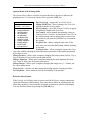
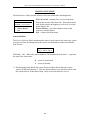
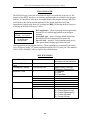
Sensor #2 can be easily accessed by opening the top cover. Looking from the front of the
machine, it will be located on the right side next to a plastic idler. This sensor reads the
front edge of the paper. If this sensor is blocked or dirty, the 2 sets of feeder pulleys will
not turn at all and a "Transport Error" will occur. This sensor can be easily cleaned with
air or a brush.
If the feeder pulleys are turning and the paper doesn't reach the sensor fast enough, a
"Transport Error" will occur. This is usually caused by dried/worn out front feeder
pulleys or an obstruction holding the paper back.
Sensor #2
Feeder Pulley
(Rear View)
- 25 -