1
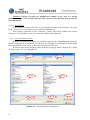
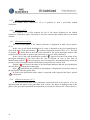
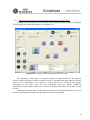
The participant himself/herself is able to switch off the switched on microphone through
his/her own unit, but the technician is also able to do so, if he/she clicks with the mouse on
button «Withdrawing the word » (C.13.). At this point the name of the participant disappears
from table «Speakers» (C.15.) and symbol « » in front of his/her name changes to symbol
« » in tables «Participants» (C.14.) and «Former Speakers» (C.17.).
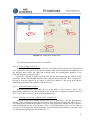
An other possible way to give the word is the following: The name of that speaker has
to be selected from either table «Participants» (C.14.) or table «Expectants» (C.16.) or table
«Former Speakers» (C.17.), to whom we wish to give the word, and then by clicking on it and
keeping the button pressed the name has to be dragged to the list of «Speakers» (C.15.). After
releasing the left button of the mouse the microphone of the selected participant is switched
on and symbol « » appears in front of his/her name. With this same drag and drop method
applied in the opposite direction it is possible to switch off an active microphone.
In the above manner it is possible to move to-and-fro the participants freely between the
tables, only table «Expectants» (C.16.) and table «Former Speakers» (C.17.) represent
exceptions from under this, since it is not possible to move to these tables a participant, it is
only possible to remove a participant from these tables. Also the name of the participant is left
in table «Former Speakers» (C.17.) after removal, since a participant cannot be removed from
here, once he/she has made a speech during the conference.
Participants, who have priority higher than level 0 are always able to switch their own
microphones on, if there is a free channel available. In case there is no free channel available,
then a higher priority unit takes away the word from that unit with lower priority that has
spoken for the longest.
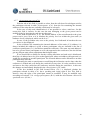
«Automatic 1» operation mode
In this operation mode if there is a free channel then the word requesting participant
automatically gets the word. If there is no free channel available and there are a lower priority
speakers, then the word will be taken away from that speaker, who has been speaking for the
longest, otherwise the word requesting participant is added to the waiting list. If a channel is
freed then the participant, who is on the first place on the waiting list will automatically get
the word.
o
«Automatic 2» operation mode
In this operation mode if there is a free channel then the word requesting participant
gets the word automatically. If there is no free channel available and there are speakers of
lower or identical priority, then the word will be taken away from the speaker from among
them, who has been speaking for the longest, otherwise the word requesting participant is
added to the waiting list. If a channel is freed then the participant, who is the first on the
waiting list will get the word automatically.
The technician may give the word and take away the word from any of the participants
in both automatic operation modes.
o
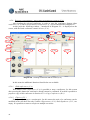
4.5.8.7. «Add to speakers’ list» (C.13.)
With the aid of this button it is possible to give the word to or withdraw the word from a
participant, and this operates both in manual and automatic operation modes. Button «Add to
speakers’ list» (C.13.) is active only if the selected participant has an own unit, or his/her card
has been inserted into the card reader of one of the units, and presenting a speech is permitted
for the given participant and there is a free channel or the word may be taken away from a
unit of lower priority.
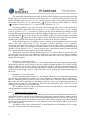
In addition to the above with button F5 of the keyboard it is also possible to give or take
away the word from the selected participant.
42