1
Initial Settings
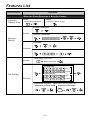
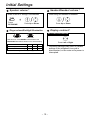
Speaker volume *
Handset/Headset volume *
While on-hook or during a conversation
While using the handset or headset
SP-PHONE
SP
Press
SP-PHONE.
Press Up or Down.
Press Up or Down.
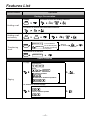
Display contrast *
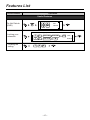
Ringer volume/Backlight illumination
KX-T7730/7731/7735/7736
2
RINGER
0
1
BACKLIGHT
Slide the lever of the RINGER Volume Selector and
BACKLIGHT Illumination Selector to the desired setting.
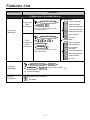
BACKLIGHT SW POSITION
2
1
LCD backlight
HIGH LOW
DIALING BUTTONS backlight AUTO AUTO
0
OFF
OFF
AUTO: The backlight shines only during operation.
Press Left or Right.
* The above settings may return to default
settings if the telephone line cord is
disconnected, or the main unit's power is
interrupted.
– 10 –