1
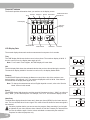
3.The Console will display one of the Custom Goal Programs ( Time, Calorie or Distance ) by activating their display
field. Push the GOAL/LOCK button to move through the options.
Note: The Console will show the default value, or the last custom value, for each option. The default goal values are:
Time= 20 minutes, Calories= 100, Distance= 5 miles.
4. With your desired goal selected, push the Increase and Decrease buttons to adjust the custom goal value.
5. Push START/STOP to accept the custom goal value. Your Custom Goal Workout will now begin.
Paused / Results Mode
To Pause a workout:
1. Stop pedaling and push the START/STOP button to pause your workout.
Note: The Console will automatically pause if there is no RPM signal for 5 seconds.
2. To continue your workout, push START/STOP or start pedaling.
When paused, the workout values will flash as the Console displays each value. You can use the Increase/Decrease buttons to move through the other workout values manually.
To clear the workout values and go back to Idle Mode, push and hold down START/STOP for 3 seconds. The Console will
make an audible beep to confirm the action. If the Console does not receive any input in approximately 5 minutes, it will
automatically shut off.
23