1
E6581680
6.6. Parameter settings: Batteries
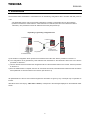
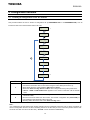
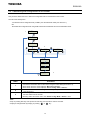
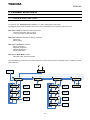
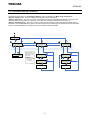
The diagram below shows the "Parameters / Battery" menu accessible from "Main menu / Parameters".
"Battery / Charge level" : This menu displays the Parameter writer charge level.
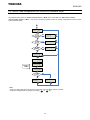
"Battery / Alarm level" : This menu is used to set message activation at a particular charge level. It warns the user
about the battery charge status according to the set value (see message fault detected on section 6.7).
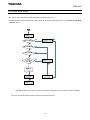
"Battery / Set battery type" : This menu is used to select the type of battery used by the Parameter writer (normal
batteries or rechargeable batteries). Users must ensure that the correct battery type is selected so that the Parameter
writer can accurately display the charge level. This also affects message activation.
Parameters
Battery
ENT
ESC
ESC
Battery
Charge level
ESC
Battery
Alarm level
ENT
Battery
Set battery type
ENT
ENT
ENT
Charge level
78%
Press and hold the up
or down arrow key to
define this level value
more quickly.
Alarm level
20%
Value between
[0 and 50] %
Alarm level
NN%
ESC
ESC
Set battery type
Normal
ESC
ESC
Set battery type
Rechargeable
ENT
ENT
Save the level
Save the battery type
21