1
Chapter 1 Quick Start
RIGOL
User Interface
①
②
③
④
⑤
⑥ ⑦
⑧
⑨
⑩
⑪
⑫
⑬
⑭
⑮
⑯
⑰
⑱
⑲
⑳
21
22
24
23
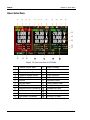
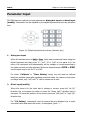
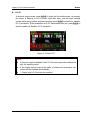
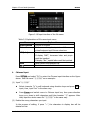
Figure 1-3 User interface of DP1308A
①
Channel output state
⑬
Output voltage
②
Channel mark
⑭
Output current
③
Selected channel*
⑮
Output power
④
Constant voltage output
⑯
O.V.P input box
⑤
LAN connecting
⑰
O.C.P input box
⑥
Keylock
⑱
Operation menu
⑦
Self-test failed
⑲
Timing output mark
⑧
O.T.P mark
⑳
Time for timing output
⑨
Remote control connecting
21
Voltage input box
⑩
U disk detected
22
Current input box
⑪
Help system mark
23
Track mark
⑫
The beeper is enabled
24
O.V.P/O.C.P state
NOTE*: The channel is highlighted on the screen (in breath state).
1-6
User’s Guide for DP1308A