1
21. MVR Group
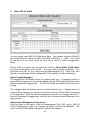
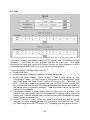
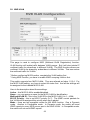
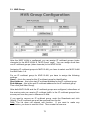
After the MVR VLAN is configured, you can assign IP multicast groups (video
channels) to the MVR VLAN in “MVR Group” page. You can assign more than
one IP multicast groups (video channels) to one MVR VLAN.
Assigning IP multicast groups to MVR VLAN, you have to select one MVR VLAN
first with index 1~4.
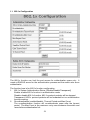
For an IP multicast group for MVR VLAN, you have to assign the following
settings.
Name – this is the name for this IP multicast group for identification.
Start Address – this is the start IP multicast address for the IP multicast group.
End Address – this is the end IP multicast address for the IP multicast group.
Then click [Add New Group].
After both MVR VLAN and the IP multicast groups are configured, subscribers at
the receive ports can receive IP multicast traffic in the IP multicast groups from
source port even they are in difference VLANs.
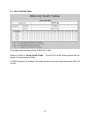
If you want to remove an IP multicast group, mark the Deactivate and click
[Apply]. The IP multicast group will be removed from the list.
Note: The list does not support edit function. If you want to make any
modification, you have to remove it first. Then create the new one.
70