1
getting started
main menu
Throughout the manual, controls for keyboard/mouse control are listed first,
followed by equivalent gamepad controls in parentheses.
On the opening menu, you will be presented with six options:
Start New Game
Keyboard/Mouse Controls
Right Mouse Button
Left Mouse Button
Hold Left Mouse Button
Space
“F” Key
“1” Key
“2” Key
“3” Key
“4” Key
“R” Key
“D”/”A” Keys
Mouse Wheel
“W”/”S” Keys
Arrow Keys
“Esc”
Tab
“X” Key
Move Bard
Attack
Alternate Attack
Block
Use/Interact (Open item, initiate conversation)
Artifacts Menu
Summons Menu
Melee Weapons Menu
Special Weapons Menu
Heal Shortcut
Rotate Camera Right/Left
Zoom Camera In/Out
Zoom In/Zoom Out
(Up) Attack, (Down) Defend, (L) Stay, (R) Follow
Pause Game/Game Menu/Skip Cut Scene
Character Sheet
Toggle Map
Select this option to begin playing. Next, you may select the game difficulty:
Easy, Normal or Olde School. The Bard would choose Easy, for it’s the easiest
way out. Choose Olde School to see the Bard get the beating he deserves, but
keep in mind there will be far fewer save points in the game. If you are neither
wimp nor stallion, choose Normal. To make menu selections, either left-click
your mouse or press button “2” on the gamepad.
Next you will be taken to the Character Generation Screen, where you may
either set the Bard’s attributes to your liking or select “Auto Allocate” to have
the game choose them for you.
Generate Character: The Bard’s starting attributes will vary depending on
the difficulty level. Attributes are as follows:
Strength- The stronger the Bard is, the more damage he can inflict
in melee combat.
Vitality- A high vitality will improve the Bard’s health and make him
more difficult to defeat in battle.
Luck- Luck has a subtle effect on many aspects of the Bard’s adventures.
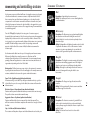
Gamepad Controls
6
Left Thumbstick
Direction Buttons
Right Thumbstick
Left Trigger 1 (5)
Left Trigger 2 (7)
Right Trigger 1 (6)
Right Trigger 2 (8)
1 Button
2 Button
3 Button
Start (10)
Select (9)
Move Bard
Group Commands
Camera Control—Press: Toggle Map
Select Melee Weapon
Select Ranged/Alternate Melee Weapons
Open Tune Selection Menu
Open Artifact Selection Menu
Use
Tap: Attack-Hold: Alt. Attack
Block
Pause Game/Game Menu
Character Sheet
Dexterity- A high dexterity allows the Bard to inflict greater damage
with ranged weapons.
Charisma- Shopkeepers will offer significant discounts to the Bard if
he has high charisma.
Rhythm- Rhythm allows the Bard to play magical tunes with greater
skill which enhances the abilities and strengths of summoned creatures.
Once attribute levels are set, click on Continue (10). You will be asked to
choose a talent.
7