1
DI-145 Hardware Manual
Table of Contents
Warranty and Service Policy ................................................................................................................ iii
1. Introduction ........................................................................................................................................ 1
Features .............................................................................................................................................. 1
Analog Inputs .................................................................................................................................... 1
Digital Inputs ..................................................................................................................................... 1
Software ............................................................................................................................................. 1
WinDaq® Recording and Playback Software ............................................................................ 1
The DATAQ Instruments Hardware Manager ............................................................................ 2
Help ............................................................................................................................................. 2
2. Specifications ...................................................................................................................................... 3
Analog Inputs .................................................................................................................................... 3
Digital Inputs ..................................................................................................................................... 3
Reserved Inputs (Digital Inputs) ........................................................................................................ 3
ADC Characteristics .......................................................................................................................... 3
Indicators and Connections ............................................................................................................... 3
Power ................................................................................................................................................. 4
Environmental ................................................................................................................................... 4
Physical Characteristics ..................................................................................................................... 4
Software Support ............................................................................................................................... 4
3. Installation .......................................................................................................................................... 5
Installing WinDaq Software and the DATAQ Instruments Hardware Manager ............................... 5
Connecting the Instrument to Your Computer .................................................................................. 6
DATAQ Instruments Hardware Manager ......................................................................................... 6
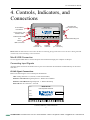
4. Controls, Indicators, and Connections ............................................................................................. 7
Mini-B USB Connection ................................................................................................................... 7
Connecting Input Signals ................................................................................................................... 7
DI-145 Signal Connections ......................................................................................................... 7
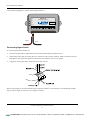
Connecting Signal Leads ............................................................................................................ 8
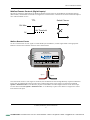
WinDaq Remote Controls (Digital Inputs) ................................................................................. 9
WinDaq Remote Events ....................................................................................................... 9
WinDaq Remote Storage (Record) ....................................................................................... 11
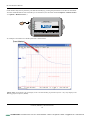
4-20mA Current Loop Measurements ............................................................................................... 11
LED Indicators .................................................................................................................................. 13
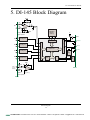
5. DI-145 Block Diagram ....................................................................................................................... 15
6. Dimensional Drawing ......................................................................................................................... 17
Table of Contents
vii
ALTHEN GmbH • Frankfurter Str. 150-152 • 65779 Kelkheim • Telefon +49 (0)6195 / 70060 • info@althen.de • www.althen.de