1
*OUFSQIPOF'VODUJPOT0QUJPOBM
2 Operation
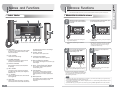
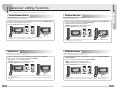
These functions enable you to check the status outside the entrance.
ⶺChecking outdoor status
Chapter
&OUSBODF'VODUJPOT
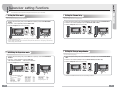
These functions enable you to make internal calls when another monitor is installed.
ⶺMaking internal calls
When there is one door pin
If you press the Call button in standby mode, the entrance image is displayed on the screen and
a call is connected.
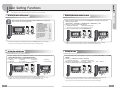
Press the Interphone button with
the handset picked up.
A melody sounds from sub-phone.
To hang up the call;
During the speakerphone mode,
press the Call button of the
Monitor, during the handset mode,
replace the handset of the Monitor.
If you press the Call button with the handset picked up, the phone is connected in handset mode.
ⷅ
If you press the Call button in standby mode, the phone is connected in speakerphone mode.
The outdoor image can be displayed for up to one
minute.
ⷅ
You can open the entrance door by pressing the Door
Open button while the outdoor image is displayed.
ⷅ
An incoming bell signal occurs in another
monitor
ⷅ
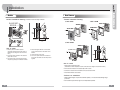
When there are two or more door pins
Now, you can accept the call with
the handset of the subphone.
If you repeatedly press the Call button, the entrance hall images are displayed in turn.
If the current call is switched to speakerphone mode
ⷅ
by pressing the Call button in handset mode, you can
continue the call in speakerphone mode after
replacing the handset.
The outdoor image screen is automatically turned off after 50 ~ 60 seconds.
Doorbells and multi panels do not support “Checking outdoor status.”
ⷅYou can open the entrance door by pressing the Door Open button while the outdoor image is displayed.
ⷅ
ⷅ
6
/PUF
1. If internal calls are not answered for one minute, the calls are disconnected.
2. Internal calls are automatically hung up after 3 minutes.
7