1
2. Description of the Piranha
Standards and Com pliances
2.5.4
33
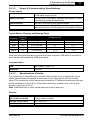
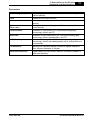
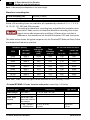
FCC Certification
Piranhas of product version 3.1 and newer contains FCC certified transmitter module
(Bluetooth).
FCC ID R47F2M03GX
This device has been tested and found to comply with the limits for a Class-B digital
device, pursuant to part 15 of the FCC rules. These limits are designed to provide
reasonable protection against harmful interference when the equipment is operated
in commercial environment. This equipment generates, uses and can radiate radio
frequency energy and, if not installed and used according with the instruction manual,
may cause harmful interference to radio communication. Operation of this equipment
in a residential area is likely to cause harmful interference, in which case the user will
be required to correct the interference at his own expense.
2.6
2.6.1
Maintenance
Updating the Piranha Firmware
All firmware that is controlling the function of the Piranha is stored in flash memory to
allow quick and easy update. The RTI Updater with the latest firmware is always
available free of charge on the RTI Electronics Web site at http://www.rtigroup.com. To
update your Piranha you must first download the latest version and install it on a PC.
The PC needs to have an USB port.
You will need to have access to an administrative account to install the software.
To update the Piranha firmware (or bootloader):
1. First download the latest version of the RTI Updater Setup from RTI Electronics
Web site.
2. Unzip the file and run the file "RTI Updater Setup.exe" to install it on your PC. In the
end of the installation process you will get the question if you want to run that
updater immediately. If you have your Piranha available you can connect it as
described in step #3. Answer "Yes" and continue with step #6.
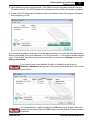
3. Connect the Piranha. Use the USB cable that came with your Piranha to connect
your Piranha to one of the USB ports on the PC. Power on the Piranha. Use the
power supply to ensure that no power failure occur during the update process. If
you do not have a power supply available, make sure you have fresh batteries in the
Piranha. You will get a notice about that.
2015-05/5.5D
Piranha Reference M anual