1
Smart Card Contact Station Interface
1
Introduction
When
a command to the printer interface sends a card to the smart card contact station, the
printer
connects
thethe
smart
contact
station to the female DB-9 connector on the rear of
Thank you
for choosing
Javelincard
J360i
Card Printer.
the
printer.
This manual guides you to efficient start up and operation of your new Card Printer.
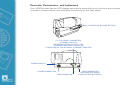
Printer Features
The following shows the main functional features found on your J360i Printer.
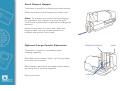
DB-9 CONNECTOR LOCATION FOR SMART CARD
STATION (OPTIONAL)
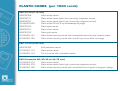
An attached external smart card programmer can be used to program smart card chips.
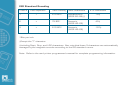
The following table shows the smart card contact points.
DB-9
Pin Smart Card Contact Points
DB-9 Pin
Smart Card Contact Points
1
C1 (VCC)
6
C6 (Vpp)
2
C2 (Reset)
7
C7 (I/O)
3
C3 (Clock)
8
C8 (RFU)
4
C4 (RFU)
9
(GND when chip is at station)
5
C5 (GND)
2
48