1
Function
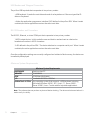
Read only cards with this bit
count
Strip leading parity bit count
Strip trailing parity bit count
Invert Wiegand data
Reverse Wiegand data
Reverse bytes
Description
No data is sent from the device unless the bit count is
matched. The total bits received from the card must match
this bit count, parity bits included. If checked and 26 is
entered in the field, the device will only respond to 26 bit
cards.
Set the device to strip leading parity bits from 0 to 15.
Set the device to strip trailing parity bits from 0 to 15.
Check if using a legacy application that requires the
Wiegand data to be inverted.
Check to reverse the order of Wiegand bits. This is
primarily used for Card Key proximity cards.
Check to read the card data in a reverse byte order. Use
this feature with MIFARE CSN readers. For 56 bit cards, go
to the ‘Set Key Stroke Data’ tab and set the Bit Count of ID
Portion to 56.
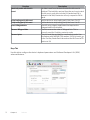
Keys Tab
Use this tab to configure the device’s keyboard parameters and Software Developer’s Kit (SDK)
advanced features.
20
Chapter 3
Software