1
Appendix D
Supports
Support information (Location and its type) from Plant Design software can be transferred to CAEPIPE in two
ways viz.
1. With the use of mapping DB
2. Without using Mapping DB
With the use of mapping DB
In many large organizations, the Plant Design Engineer is responsible only for generating the Piping Layout and
the Stress Engineer will be responsible for carrying out the detailed Stress Analysis. Hence, the Plant Design
Engineer may not have details on mathematical supports equivalent to Plant Design physical support
configurations. In such cases, the Stress Engineer can define the mathematical supports equivalent to Plant
Design software using the “SupportType.mdb” file and can instruct the Plant Design Engineer on filling such
information in the Plant Design software at Support locations. The Plant Design Engineer can then produce the
Neutral file from the Plant Design software and convert the same to CAEPIPE using the translator. The details
on entering the information and transferring the same to CAEPIPE are listed below.
Transfer of Supports
The support details (entered via attributes) and its location specified in the Plant Design software are transferred
to CAEPIPE. The values of the attributes filled at support locations shall be in accordance with the values
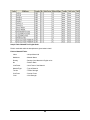
specified in the field #1 of tables “Zvertical” and “Yvertical” of “SupportType.mdb” built into this software. The
values from field #1 of table “Zvertical” shall be referred and entered at the support locations (via attributes), if
the Global Vertical Axis to be used in the Stress Model is “Z”. On the other hand, values from field #1 of table
“Yvertical” shall be referred and entered at the support locations (via attributes), if the Global Vertical Axis to be
used in the Stress Model is “Y”.
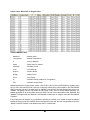
Fortunately, the values entered/available in the field #1 of tables “Zvertical” and “Yvertical” are kept identical,
because most Plant Design software always consider the vertical direction as Z-axis. On the other hand, pipe
stress engineers in different parts of the world use either Z-axis as vertical or Y-axis as Vertical. So, the values
entered in the field “KpSupport” are different for “Zvertical” and “Yvertical”. Program always uses the value
entered in the field “KpSupport” corresponding to the value entered in field “PdSupport”, for its stress model file
generations. For details on filling the field “KpSupport”, refer the section “Without using Mapping DB” described
below.
User can modify the values available in the field “PdSupport” of tables “Zvertical” and “Yvertical” to suit their
requirements. It is recommended to keep the values entered in the filed “PDSupport” of tables “Zvertical” and
“Yvertical” identical as much as possible. This will help to avoid the user in reentering/changing the values at
support locations for different Global Vertical Axis.
In case, the CAEPIPE support information corresponding to the attribute value entered in the Plant Design is not
available/defined in the mapping DB, then the translator skips that support at the location.
Note: Refer the Plant Design Readme supplied along with the product for filling the Support Information in Plant
Design software. For example, refer the file PDMS.hlp for details on filling the Support Information at support
location in PDMS.
23