1
Chapter 4 Connecting MKY46
4.5
Network Cable Length
In this manual, each connection point of a multi-drop network cable is called a “branch”.
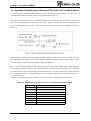
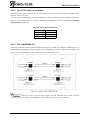
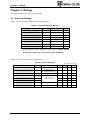
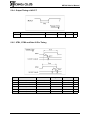
Table 4-1 indicates the network cable length for the CUnet when using the network described in “4.3 Connecting Network Interface” with 32 or less branches.
Table 4-1 Network Cable Length
Baud rate
Network cable length
12 Mbps
100 m
6 Mbps
200 m
3 Mbps
300 m
The recommended differential driver/receiver is an RS-485-based driver/receiver. Therefore, the branch
count “32” stipulated in the RS-485 specification is used as a guide in Table 4-1.
Up to 64 CUnet stations can be connected to the CUnet, enabling connection of “64” branches. This recommended network is isolated electrically by a pulse transformer and the format of signals propagated through
the network is RZ (Return to Zero). Consequently, “64” branches can be connected using a standard RS485-based driver/receiver without using DC component signals. In this case, the cable length is likely to be
shorter than the value in Table 4-1 (due to increase of dispersion of propagated signal energy).
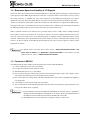
Network cable length can be extended by setting the frame option or adding HUB(s). For
detail, refer to “3.9 Support for Frame Option [for HUB]” and “User’s Manual” of
HUB-IC MKY02.
The network cable length varies depending on the cable quality, differential driver/receiver
components, cable connection status, and environment. Therefore, values in “Table 4-1
Network Cable Length” are only a guide and performance is not guaranteed.
4.6 Setting of Frame Option (#LFS)
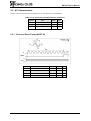
The MKY46 has the #LFS: Long Frame Select pin (pin 11) that sets a frame option. When not setting the
frame option, fix the #LFS pin at High. When the CUnet is started with the #LFS pin set to Low, the CUnet
system is set to the frame option.
When setting the frame option (when setting the #LFS pin to Low), refer to “3.9.1 Cautions for Setting
of Frame Option”.
4-7