1
- 20 -
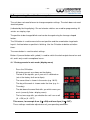
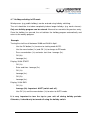
9.2 Entering or changing the date and time ( Mode O )
–
Press the OK button (Auto mode displays).
–
Press the menu button (3x) until the pointer in the
display is above the O symbol (time).
–
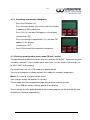
Press the OK button (1x). The current date appears in
the display.
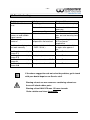
9.2.1 Changing the date
–
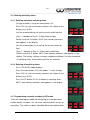
You can now select individual positions to change using
the OK button (move right) and the arrow button (move
left) (indicated by blinking display).
–
Change the value using the lozenge-shaped button.
–
Use the OK button to quit the changed position (the new
value is stored).
–
To end entering the date, press on OK until the word TIME appears in the display
(the current time is displayed).
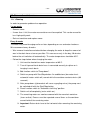
9.2.2 Changing the time
–
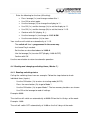
You can now select individual positions to change
(blinking on the display) using the OK button (move
right) and the arrow button (move left).
–
Change the value using the lozenge-shaped button.
–
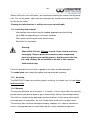
Use the OK button to quit the changed position (the
new value is stored).
–
To end entering the time, press on OK until no further position is blinking in the
display. (Auto mode is displayed – all settings are stored).
The automatic changeover to summer time has already been programmed in
accordance with the regulation applying since 30.05.1994.
(Start: Last Sunday in March – End: Last Sunday in October).