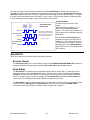
1
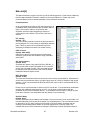
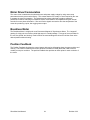
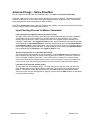
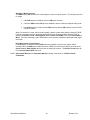
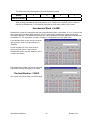
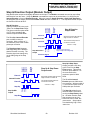
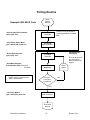
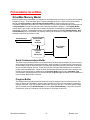
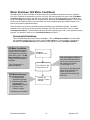
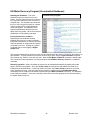
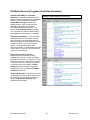
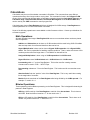
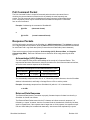
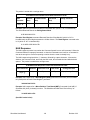
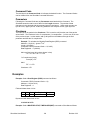
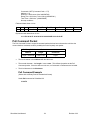
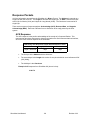
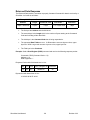
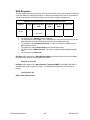
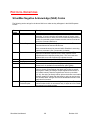
Motion Profile Input Options Table
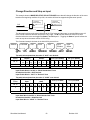
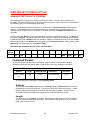
Last Check Process
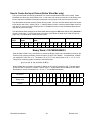
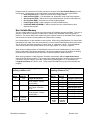
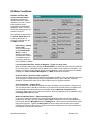
Bit # in
word
Stop Enables
Word
Stop States
Word
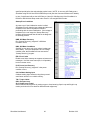
Bit 15
Toggle Preliminary
States
Set this bit to toggle
Preliminary input state
bits
Toggle OR States
Bit 14
Bit 13
Bit 12
Input #3 enabled
Input #2 enabled
Input #1 enabled
Input #3 State
Input #2 State
Input #1 State
Bit 11
Bit 10
Bit 9
Bit 8
Index enabled
Input #3 enabled
Input #2 enabled
Input #1 enabled
“1” if index is enabled
Input #3 State
Input #2 State
Input #1 State
Bit 7
Bit 6
Bit 5
Bit 4
Index enabled
Input #3 enabled
Input #2 enabled
Input #1 enabled
“1” if index is enabled
Input #3 State
Input #2 State
Input #1 State
Bit 3
Bit 2
Bit 1
Bit 0
Index enabled
Input #3 enabled
Input #2 enabled
Input #1 enabled
“1” if index is enabled
Input #3 State
Input #2 State
Input #1 State
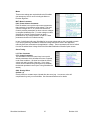
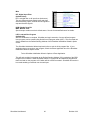
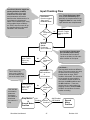
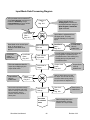
First Check
State Toggle
Bit 15 in both words is used to
toggle the states of the
Preliminary and OR conditions.
This happens if Direction toggle
conditions are TRUE
Direction Toggle Conditions
These three bits are used to
toggle direction before the motor
begins to move. If any condition is
TRUE the motor will reverse
direction.
Set this bit to toggle OR
input state bits
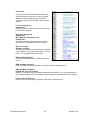
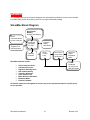
Second Check
Preliminary Conditions
This is the next condition, it is
now checked every cycle. This is
used so that a sensor can be
checked for Two-State conditions
If the Preliminary conditions are not
met checking stops here
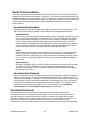
Last Check – Final
conditions:
AND Conditions
This will now allow you to check
for sensors that are to be ANDed
with the OR conditions. Normally
all sensors are ORed with each
other
OR Conditions
These conditions are all ORed
together for the final check.
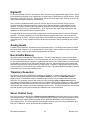
If the Final conditions are met the
motor will STOP
SilverMax User Manual
48
Revision 3.22