1
2.2. ERROR HANDLING
15
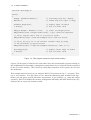
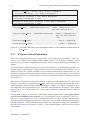
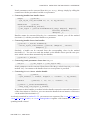
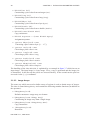
class LIntExport HException {
public:
HException(const HException &except);
HException(const char *f, long l, const char *p, Herror e, const char *m);
HException(const char *f, long l, const char *p, const char *m);
HException(const char *f, long l, const char *p, Herror e);
static Handler InstallHHandler(Handler proc);
void
PrintException(void);
static Handler
long
const char
const char
Herror
char
};
handler;
line;
*file;
*proc;
err;
*message;
/*
/*
/*
/*
/*
/*
handler in use */
line number where error occured */
file name where error occured */
Name of procedure/operator */
error number */
error text */
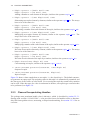
Figure 2.8: Part of the declaration of the class HException.
2.2.1
Object-Oriented Approach
If a runtime error occurs in an object-oriented operator call, an instance of the class HException
is created (see figure 2.8 for the declaration of the class). This instance contains all information
concerning the error. The important members of an exception are:
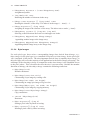
line:
file:
proc:
err:
message:
Number of the program line in which the error occurred
Name of the file in which the error occurred
Name of the actual HALCON operator
Number of the error, see below
Error text
After the generation, the instance of HException is passed to a so-called exception handler.
HALCON’s default exception handler prints the corresponding error message and terminates
the program.
As an alternative, you can implement and use your own exception handler. In order to act as a
HALCON exception handler, a procedure must have the following signature:
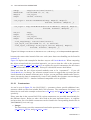
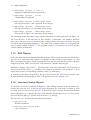
typedef void (*Handler)(const HException &exception);
You “install” your exception handler procedure via HException’s class method
InstallHHandler (see figure 2.8). In case of a runtime error, HALCON then calls
your procedure, passing the instance of the actual exception as a parameter.
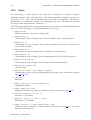
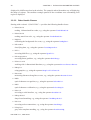
The following example shows how to use a user-specific exception handler together
with the standard C++ exception handling mechanism (try...catch).
The corresponding program example errorhandling.cpp can be found in the subdirectory
%HALCONROOT%\examples\cpp. It realizes the application mentioned above: You can type
in image files to load; if a file does not exist, the program prints a corresponding message but
continues nevertheless.
At the beginning of the program, a user-specific exception handler is installed with the folloing
line:
HALCON 6.1.4