1
How to connect the UTP cable
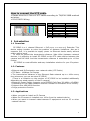
• Please wire the 4 Pairs of UTP cable according to TIA/EIA 568B method
as below.
• RJ-45 JACK Wiring
TIA / EIA 568B
No.
1
2
3
4
5
6
7
8
Color
Orange+ White
Orange
Green+ White
Blue
Blue + White
Green
Brown+ White
Brown
Tx +
Tx Rx +
DC 48V
DC 48V
Rx –
GND
GND
1 Introduction
1.1 Overview
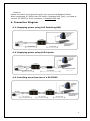
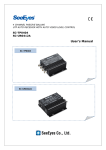
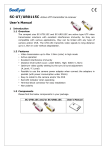
SC-IPEUP is a 1 channel Ethernet + PoE [Power over Ethernet]) Extender. This
device makes installer to solve the problem of distance limitations. Also as it
supports PoE, it is possible to supply power to Ethernet device easily without
power cabling work.
In order to extend the transmission distance (Max.100m) between network
devices, it is effective to install SC-IPEUP on the UTP cable section between the
camera and PoE HUB. And the transmission distance is extended up to +100m
further.
SC-IPEUP is a cost-effective and easy installation solution for your IP system.
1-2. Features
• Ethernet and PoE extension over network cable (UTP Cable)
• TCP Rate : 100Mbps Full Duplex
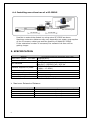
• The transmission distance of the Ethernet Data extends up to +100m every
time whenever you use an extra SC-IPEUP.
(There is a limitation on the number of SC-IPEUP to be installed additionally
depending on rated capacity of the IP camera)
• Maximum Power Supply supports up to IEEE802.3af Class 3(6.49W ~ 12.95W)
(Depending on the Cable condition and the number of connection of SC-IPEUP)
• Support Auto MDI/MDIX function
• Surge protection function
1-3. Applications
• When you want to install an IP Camera
• When the IP camera is installed over 100m from the network device
• When you want to transmit data between IP equipment such as PC or other
network devices
2