1
3-1 Preparation
Please read the relevant external equipment operation manual (BluRay
player, Set-top Box, etc.) carefully before making connections.
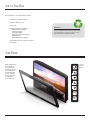
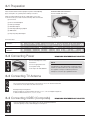
WEATHERPROOF CABLE EXAMPLE
RS-232 and USB cable shown
Cables are shipped with the product in a dedicated accessory box.
Locate the accessory box and ensure the following cables are included:
(1) Power Cord
(1) RS-232 and USB Adapter
(1) Audio Input Adapter
(1) VGA Cable Adapter
(1) Audio Output (RCA type) Adapter
(2) HDMI Cables
(1) AV (Composite) Cable Adapter
Weatherproof Connection
(to TV)
Standard Connection
(to Source)
Connection Label
Conventional Input
Illustration
Weatherproof Adapter
Illustration
3-2 Connecting Power
REQUIRES WEATHERPROOF ADAPTER
Connect included power cord to
the television.
Connect to appropriate Power
Source (GFCI outlet)
Power Input: 110-120V, 50/60 Hz
NOTE
Included power cord is appropriate for sheltered locations.
Install in accordance with local codes using a GFCI outlet.
The supplied cord may be modified for permanent
waterproof connections by a qualified electrician.
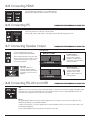
3-3 Connecting TV Antenna
Connect cable to TV Coaxial input connector with an outdoor or wall outlet antenna output.
Turn on the TV and use the input button on the remote to choose TV. Use the menu button
on the remote to choose cable or air, then run auto scan.
Watching Analog TV & Digital TV
Analog TV signal has a channel number structure of 1, 2, 3, 4, etc., but Digital TV signal has
a channel number structure of 1-1, 2-1, 3-1, 4-1, etc.
3-4 Connecting VIDEO (Composite)
REQUIRES WEATHERPROOF ADAPTER
Connect Video/Audio cables to the video ports of the TV and Standard Definition
camcorder, gaming consoles, VCR, DVD player or Set-Top box.
14