1
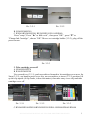
Pic. 3-7-1
Pic. 3-7-2
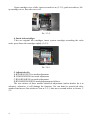
8. Adjust tube length
If step 7 is ok, skip this step.
Press sticker, then lengthen it (3-8-1) or shorten it (3-8-2), redo step 8 to adjust
tube to right lengthen.
Pic. 3-8-1 Pic.
3-8-2
9. Fix ink tube
A. R280/R285/R290
B. R260/R265/R270
C. R360/R380/R390: Fix sticker to 3-9-1, pay attention not let printer cover to
crush ink tube when close the cover (3-9-2), otherwise the ink can not flow smoothly.
D. RX560/RX580/RX590/RX585/RX595/RX610/RX680/RX690
Pic. 3-9-1
6
Pic. 3-9-2
INSTALLATION MANUAL ON CISS FOR PRINTER EPSON R270