1
3. Control panel and other functions.
3-1.Control panel
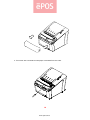
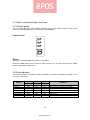
You can control the basic paper feeding operations of the printer with the button on the control
panel. The indicator lights let you to monitor the printer’s status.
Control Panel
POWER
ERROR
PAPER
FEED
Button
The button can be disabled by the ESC c 5 command.
Press the FEED button once to advance paper one line. You can also hold down the FEED
button to feed paper continuously.
3-2.Error Indicator
This section explains the different patterns signaled by the two LED indicators located on the
top cover of the printer.
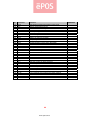
STATUS
Power off
Power on
On line
Cover open
Paper empty
Paper near end
Test mode
PAPER
RED
OFF
OFF
OFF
OFF
OFF
ON
OFF
ERROR
RED
OFF
OFF
OFF
ON
ON
OFF
OFF
POWER
GREEN
OFF
ON
ON
ON
ON
ON
ON
REMARKS
Normal power is not supplied to the printer
Normal power is supplied to the printer
Normal error-free mode
Close cover
Insert new paper roll
Paper is low
Ignored error led
15
www.eposcom.ru