1
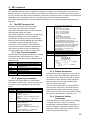
8.8. Test Mode
z
Display characters received by serial port
To enter test mode, press and hold the setup
switch. After about three seconds, the test mode
display automatically shifts to the first test menu
function, A/DTST.
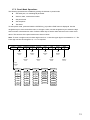
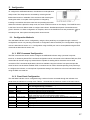
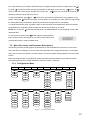
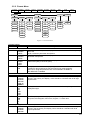
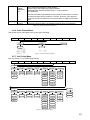
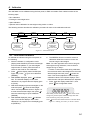
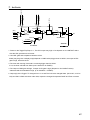
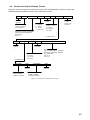
Figure 8-3 shows the Test Menu structure. Note
that, because the Test Menu functions are all on a
single menu level, Press the key to execution the
function.
Press the key to exit test mode.
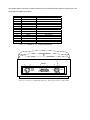
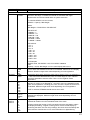
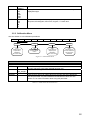
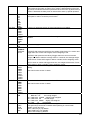
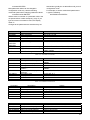
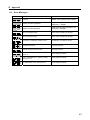
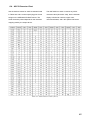
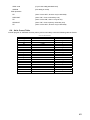
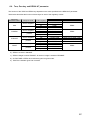
Table 8-5 summarizes the test menu functions.
In addition to normal and setup modes, test mode
provides a number of diagnostic functions for the
ADE-MAK, including:
z
Display raw A/D count
z
LCD test
z
Digital input and output monitor
z
Battery voltage monitor
z
Batter charging current monitor
z
Display digital filter raw counts
z
Reset configuration parameters to default
values
z
Transmit test character (“U”) from serial port
A/DTST
TLCD
IO
BATV
FILTR3
BATC
DEFLT
XMT U
ECHO R
Figure 8-3. Test Menu
TEST Menu
Function
Description
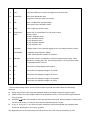
Display raw count from A/D converter.
A/DTST
Lit on all LCD segment for test LCD.
TLCD
Display digital input (Remote Switch) and output (Set Point) status
IO
00000
RSW3
RSW2
RSW1
OUT1
OUT2
BATV
BATC
FILTR3
Display battery voltage in V
Display battery charging current in A
Display filtered raw count for digital filters 3
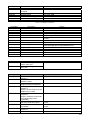
DEFLT
Default parameters
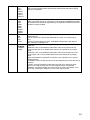
Press setup switch and Enter key at the same time to reset configuration and calibration parameters to
factory default values. Load cells must be recalibrated before using the indicator (see Section 5.1.3. ).
Transmit “U”
Press and hold Enter key to send ASCII “U” characters (decimal 85) from the serial port.
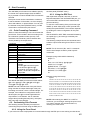
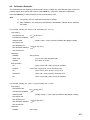
Echo received characters
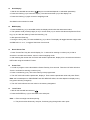
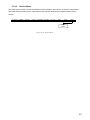
When Ready is displayed, press the Enter key to view characters received at serial port.
The first two digits show the order of the character received (see diagram).
XMT U
ECHO R
Table 8-5. Test Menu Function
51