1
PREPARATION
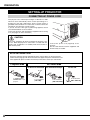
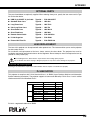
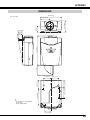
NAME OF EACH PART OF PROJECTOR
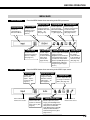
FRONT OF CABINET
SPEAKERS
TOP CONTROLS
AND INDICATORS
PROJECTION LENS ✽
✽ optional
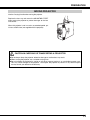
CAUTION
Do not turn on the projector with
the lens cap attached. High
temperature from light beam
may damage the lens cap and
result in fire hazard.
AIR INTAKE
VENT
INFRARED
REMOTE RECEIVER
BACK OF CABINET
POWER CORD
CONNECTOR
TERMINALS
AND CONNECTORS
INFRARED
REMOTE RECEIVER
EXHAUST VENT
HOT AIR EXHAUSTED !
Air blown from the exhaust vent is hot.
When using or installing the projector, the
following precautions should be taken.
● Do not put a flammable object near this vent.
● Keep the rear grills at least 3.3’ (1 m) away
from any object, especially from heatsensitive objects.
● Do not touch this area, especially screws
and metallic parts. This area will become hot
when the projector is in use.
This projector detects internal temperature
and automatically controls operating power
of the cooling fans.
CARRYING
HANDLE
LAMP COVER
When attaching the PJ-Net Organizer
(optional) to the projector, remove the these
parts. Refer to the owner's manual of the
optional PJ-Net organizer.
BOTTOM OF CABINET
AIR INTAKE VENTS
This projector is equipped with cooling fans for protecting from
overheating. Pay attention to the following matters to ensure
proper ventilation and avoid a possible risk of fire and malfunction.
● Do not cover the vent slots.
● Keep this side clear of any objects. Obstructions may block
cooling the air.
ADJUSTABLE FEET
AND
FEET LOCK LATCHES
7