1
Federal Commander Digital System
CCU (Central Computer Unit)
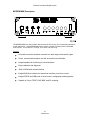
SS2000D (Siren Controller / Radio Modem Terminal Unit)
RTU (Remote Terminal Unit or Siren Controller at remote site)
CCU Description
The following is a list of specific hardware components that are required for successful operation
of the CCU.
An IBM Compatible Computer - Pentium or greater CPU running at 2.8 Ghz or faster.
Two Gigabytes or more of Random Access Memory (RAM).
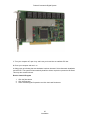
Two spare PCI BUS ports
160GB Hard Disk Drive or larger.
SVGA Color Monitor and Controller. (800 x 600 resolution minimum, 24 bit color
recommended).
CD RD-W Drive.
101-key Enhanced Keyboard.
One Parallel Printer Port - LPT1
One RS-232 Serial Port.
One Creative Labs Modem Blaster Flash56 PCI DI5630 Voice Modem (Note: Two
modems and phone lines are required if the Remote Control feature and the Automatic
Alarm Call-out option are to be used simultaneously. The PCI DI5630 type modem is a
mandatory requirement for the Alarm Call-out feature).
Mouse pointing device.
Dot Matrix Printer 24-Pin with Parallel Interface and cable.
Phone Line (Required for voice call out and remote dial-in features).
AC surge suppression device
UPS (Optional equipment to provide CCU backup in case of primary AC failure).
Measurement Computing IO Board (Optional)
The following is a list of specific software packages that are also required for successful operation
of the CCU.
Microsoft Windows
XP SP2, Windows
or VISTA operating system.
Other versions of Windows are not recommended for use with the Digital Commander software.
Note: The model SFCDWARE includes the following items: SFCDWARE CD, Software, Creative
Labs modem, Serial cable (SS2000 to computer).
Microsoft Windows is the Graphical User Interface (GUI) and provides the primary interface
between the user and the computer. Windows is designed to be used with a pointing device,
usually a mouse, which is used to make screen selections.
Because the CCU uses the Microsoft Windows operating system, the CCU can also run many
other popular Windows compatible software packages.
The SFCDWARE Software provides the control programs that handle the CCU operator interface.
All of the software packages mentioned are loaded onto the computer hard disk drive before the
CCU is installed at its permanent location. The only time floppy disks or CD ROMS are used is to
perform a backup of the data files or to install a update of the SFCDWARE software.
19
Introduction