1
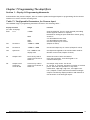
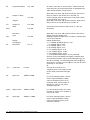
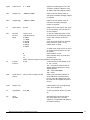
RS
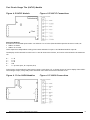
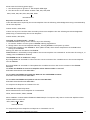
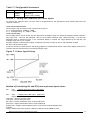
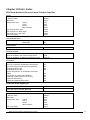
Display
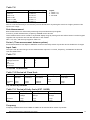
Resolution
0-255
Sets display resolution
0 & 1 = Resolution of 1 least
significant digit.
2-255 = Resolution setting of last
digits.
Note: Invalid parameter values - Should an invalid figure be entered against any parameter, it will be rejected and
the display will return to show the parameter.
* This number range will increase as new printer options become available.
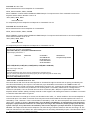
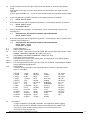
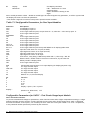
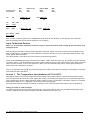
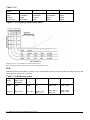
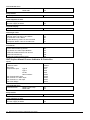
Table 7.2 Configurable Parameters for Dual Input Modules
Mnemonic
InPA
InPb
SP1
SP2
PASSWORD
HYS
OL
OA
Pb
Ont or It
OFFt or dt
dA or ct
IPLA
IPHA
IPLb
IPHb
SF
DF
OFFS
OPL
Descriptions
Live display of input 'A'
Live display of input 'B'
As for single channel inputs, except when Ab = 4, when SP1 = value set by input 'b'
As for single channel inputs
1111
As for single channel inputs
As for single channel inputs
As for single channel inputs
As for single channel inputs
As for single channel inputs
As for single channel inputs
As for single channel inputs except add 400mS to all display update time
Input low scale factor for 'A' input (no IPOF)
Input high scale factor for 'A' input (no IPSF)
Input low scale factor for 'B' input
Input high scale factor for 'B' input
Scale factor, unity being 1.0000 except when AB = 3, then unity = 001.00
Division factor, divides result of function x scale factor, by the value set
Offset provides a display offset
As for single channel inputs
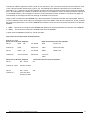
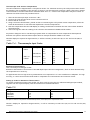
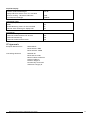
dPB
Cp
SdSt/Lab
Ln
rS
dis
Sets decimal point position for 'B' input display (for display purposes only)
For single channel inputs
For single channel inputs
For single channel inputs
For single channel inputs
Returns to A, B, function display
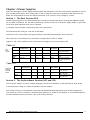
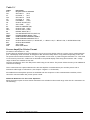
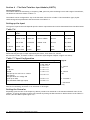
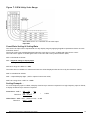
Ab
0
1
2
3
4
Function
A+B
A-B
AxB
A/B
Display = Input A, SP1 = Input B
Display =
(Result of A, B Function) x SF
DF
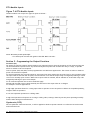
Configurable Parameters for UAFLC - Fast Strain Gauge Input Module
Note: Password Protection
To prevent unauthorised changes to parameters, other than Set Points and In-Flight compensation settings, a 4 digit
password number must be entered. Scrolling through the Set Points and In Flight settings until ‘PASS’ is displayed
accesses the number. At this point, it is necessary to enter either the factory set number 1111 in D2 - D5 positions,
or the password number specifically ordered by the customer.
41
Mantracourt Electronics Limited UAB User Manual