1
LXC620 Generator controller user manual
Dongguan Tuancheng Automation Equipment Co.,LTD.
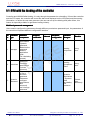
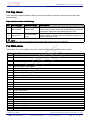
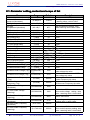
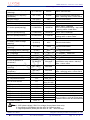
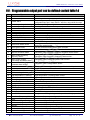
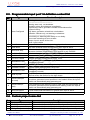
The remaining parameters configuration: only by the PC software configuration
(see the table below)
Parameter name
Factory Defaults
Alternator select
Yes
Generator Poles
Speed sensor select
4
Yes
3 phase 4 wire
Not
3
No action (only LXC620)
Not
Not
From pre-heat output to start
High water temperature input, shutdown, close to activate
(from safety on over).
Low oil pressure input, shutdown, close to activate
(from safety on over).
AC Power Supply
Fast loading mode
Crank Times
Enable immediate mains dropout
Volt Transformer
Fuel pump control
Digital Input 1
Digital Input 2
Digital Input 3
Digital Input 4
Digital Output 1
Digital Output 2
Digital Output 3
Digital Output 4
LED1 configuration
LED2 configuration
LED3 configuration
LED4 configuration
Time Multiplier
Over Current Action
Low oil level input, warning, close to activate, (always activate).
High oil temperature input, shutdown, close to activate
(from safety on over).
External alarm input, shutdown, close to activate
(always activate).
From pre-heat output to start
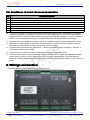
Common alarm
ETS solenoid output
Idle /High speed control
The system in automatic mode
Common to Start Alarm
Common shutdown alarm
Common alarm
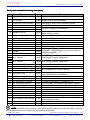
36
Trip shutdown
Gens Freq. Of Crank Disconnect
15Hz
Gens Speed Of Crank Disconnect
Gens Oil Pressure Of Crank
Disconnect
Starting Oil Pressure Detect
Genset regular star
SMS function is activated
Phone number1-5
450RPM
Digital Input 5
Digital Input 6
Not use
Yes
No
Yes
No
LXC620 User Manual
�: T:+86-769-23836636
Dongguan Tuancheng Automation Equipment Co.,LTD.
�: F:+86-769-23166296
� :www.lixise.com
Page
24 of 35