1
Playback
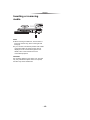
Inserting or removing
media
Playback
Notes
≥ When inserting a media item, ensure that it is
facing the correct way, which is the right side
facing up.
≥ If you connect a Panasonic product with a USB
connection cable, the setup screen may be
displayed on the connected equipment. For
details, refer to the instructions for the
connected equipment.
CAUTION
Do not place objects in front of the unit. The disc
tray may collide with objects when it is opened,
and this may cause malfunction.
- 15 -