1
RS4so_DE.book Seite 76 Montag, 6. August 2001 2:42 02
the detection zone, warning field and measured contour will
be ascertained and automatically displayed on the screen on
their entirety. This feature gives you a quick overview of the
field proportions.
4.7
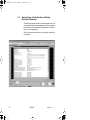
Displaying Measurement Values and Fields in
the Contour Area
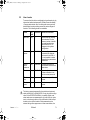
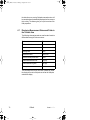
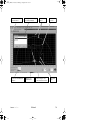
The following color assignments are used to make it easier to
differentiate among the various contours:
Contour
Color
Minimum detection zone
blue
Detection zone
red
Warning field
green
Measured contour
yellow / red
Selected mouse pointer area
yellow
Deactivated detection zone
light gray
Deactivated warning field
dark gray
Mouse pointer
dark blue
The information block in the main menu, bottom left, shows
the display of the active field pairs as well as the field pairs
selected for display.
76
RS4soft
Leuze lumiflex