1
Chapter 7: Set-Up For 2392 Emulation
2392-TCP/IP (Over Ethernet)
7.2 2392-TCP/IP (Over Ethernet)
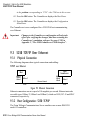
7.2.1 Physical Connection
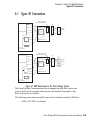
The following diagrams show typical connections and cabling:
TCP/IP over Ethernet
HP3000
10-BaseT
100-BaseT
Ethernet Network
TCP/IP
TCP/IP
10-BaseT
100-BaseT
9500
CommServer
Figure 7.2 TCP/IP Connections
Ethernet connections run at a speed of 10 or 100 megabits per second. Ethernet
networks running at 10 Mb/s use cable types 10Base-T, 10Base5 and 10Base2,
which use RJ45, DC-15 and BNC connectors, respectively. Ethernet networks
running at 100 Mb/s use 100Base-T cables, which also use RJ45 connectors.
The Communications Server’s onboard Ethernet connection supports 10Base-T and
100Base-T Ethernet.
7.2.2 DTC Configuration: 2392-TCP/IP
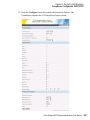
The following is an example of a DTC configuration for a TCP/IP connection.
The more important definitions (in relation to the Psion Teklogix system) are
highlighted.
Important:
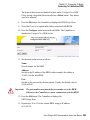
This section assumes that you are familiar with NMMGR on
an HP/XL and have a working knowledge of HP Openview
DTC Manager.
THE DTC SETUP SHOULD BE PERFORMED BY
QUALIFIED PERSONNEL, WHO ARE FAMILIAR WITH
ITS CONFIGURATION!
138 Psion Teklogix 9500 Communications Server User Manual