1
6.3 DEVICENET PARAMETERS
There are some parameters in the drive that need to be verified in order to ensure proper DeviceNet
communication.
6.3.1
n003 Run/Stop and n004 Frequency Selection
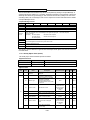
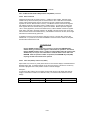
The run/stop commands and frequency reference command can originate from DeviceNet
communication, the digital operator, or the external terminals. The origin of the run/stop command
does not have to be the same as the origin for the frequency reference command. Parameter n003
(Operation Method Selection) sets up the origin of the run/stop commands. Parameter n004
(Reference Selection) allows you to set up the origin of the frequency reference. Parameter n003 is
Modbus register number 103h, and parameter n004 is Modbus register number 104h (see Appendix
A V7N Modbus Registers). When the DeviceNet network is connected to the V7N Embedded
DeviceNet Communication Drive, the motor speed and the status of the drive can be monitored via
DeviceNet while controlling the drive from another source specified by parameters n003 and n004.
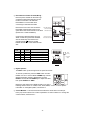
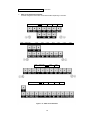
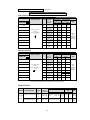
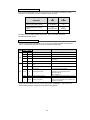
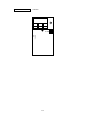
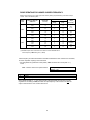
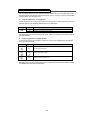
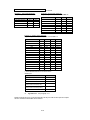
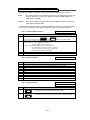
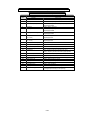
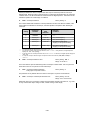
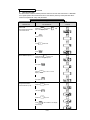
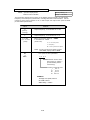
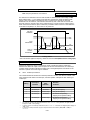
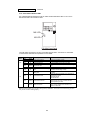
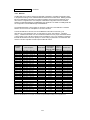
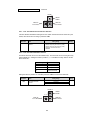
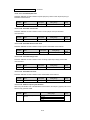
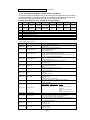
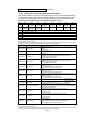
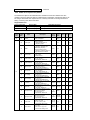
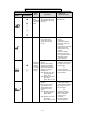
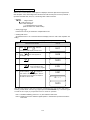
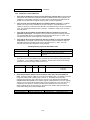
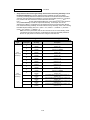
The chart shown below illustrates the possible frequency reference and run/stop selections.
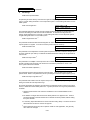
Parameter n003 (103h) Setting
0
1
2
3
Operation Method Selection (Run/Stop)
Digital Operator
External Terminals
Reserved
DeviceNet
The default setting of parameter n003 is ‘3’
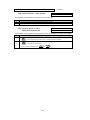
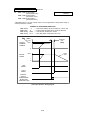
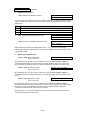
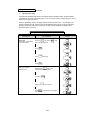
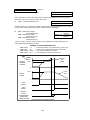
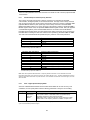
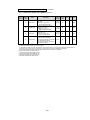
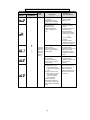
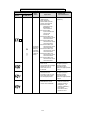
Parameter n004 (104h) Setting
0
1
2
3
4
5
6
7
8
9
Frequency Reference Selection
Digital Operator Pot
Digital Operator
Reserved
Reserved
Reserved
Reserved
Reserved
Multi-Function Analog Input CN2 (0 to 10V)
Multi-Function Analog Input CN2 (4 to 20mA)
DeviceNet
The default setting of parameter n004 is ‘9’
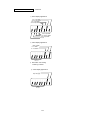
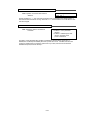
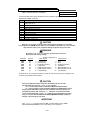
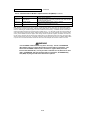
Note: When either Operation Method Selection or Frequency Reference Selection is set for DeviceNet control and
DeviceNet communication to the drive has not begun, the operator will flash "CAL". This alarm indicates that the drive is
waiting for DeviceNet communication to operate the drive. Once DeviceNet communication to the drive begins, the "CAL"
alarm will cease.
6.3.2
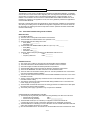
n035 – Digital Operator Display Mode
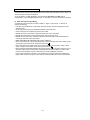
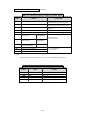
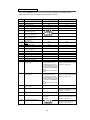
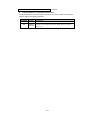
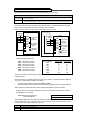
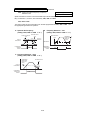
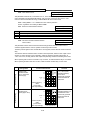
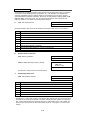
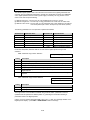
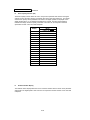
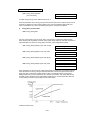
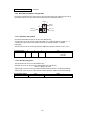
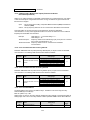
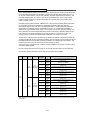
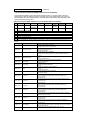
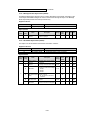
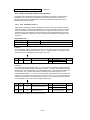
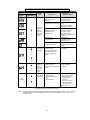
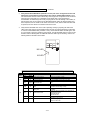
Since the V7N Embedded DeviceNet Communication Drive utilizes the AC drive for many of its
calculations, such as speed please check the following parameters to verify the correct setting.
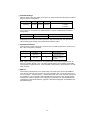
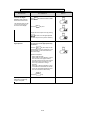
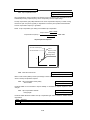
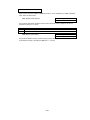
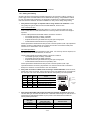
Setting No.
n035
Name
Frequency
reference set /
display unit
selection
Description
Make sure to set number of motor poles (2 ~ 39) to input and output
motor speed in RPM’s on DeviceNet control and operator display.
DeviceNet indicates the motor speed unit as RPM.
n035 setting value is used since the drive converts frequency to RPM.
Default value is 4 for frequency reference in RPM for a 4-pole motor.
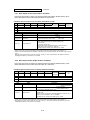
Note: The V7N requires power to be cycled to the drive for the changed parameter to take affect. Please perform a power
cycle to store DeviceNet parameter changes.
6-7