1
Device Setup
Manual Setup
Changing the Reading
1. You can scale the 4–20 mA reading to correspond to the desired scaled
reading by selecting Change within the Scaled D/A Trim menu.
2. Enter the meter reading that would be displayed with a 4 mA input
signal. For example, the voltage across a 500-ohm resistor will be 2.000
V at 4 mA and 10.000 V at 20 mA (actual values displayed will be
within ±1.5 mV of these theoretical values).
3. The communicator will then prompt you to enter the meter reading for
the 20 mA input signal.
Field Device Information
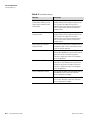
The Field Device Information item allows you to set other information
types into the transmitter.
1. Source Type: Select the type of source used – Cs-137, Co-60, or Am241.
2. Last Setup Location: This item shows you where the last setup location
was.
3. Sensor Serial Number: This item shows the sensor serial number.
4. Universal Variables: This submenu contains three items –
Manufacturer, Model, and Poll Addresses. The Manufacturer and
Model items are read-only. The Poll Address item allows you to change
the unit’s polling address.
5. Pipe Description: Enter a description that will help you identify the
pipe upon which the gauge is installed. You can use up to 12
characters.
6. Pipe ID: Enter the pipe ID if required.
7. Process Description: Enter a description that will help you identify the
process material being measured. You can use up to 28 characters.
Thermo Fisher Scientific
ConsistencyPRO User Guide
4-9