1
ARIES User Guide
Human Ethics Module
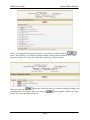
To print your application, click the
button on the Header tab. Select the magnifying
glass that relates to the Review Level of your application. The continue button will take you back
to the Header tab. Don’t press the continue button unless you want to be taken back to the Header
Tab.
Submitting
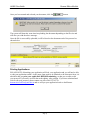
If you are satisfied that the application is now complete go to the
the
screen and click
button.
Remember: You may save your application and exit ARIES at any time after you have entered
the names of investigators, and then return to it and make changes and/or submit it. You may also
print the form at any time and work on the hard copy.
You should now sign the form and get it signed by your supervisor (if appropriate). Once your
application has been signed, you are ready to submit your hard copy application to Research
Integrity & Compliance. An email will be sent to you once you submit advising how many copies
to bring to our office (Bldg10b).
Page 16