1
feature
items more than once. Since the final
state of the GUI is the same, a tester
might not spot this. However if a log
file is examined and it states that certain items were drawn more than once
then the problem can be identified.
Another way to detect the same
style of problem is to deliberately slow
down the GUI. Add a delay in some
low-level drawing routine and the
whole GUI will move in slow motion.
You will see the display being gradually built up as different elements are
drawn. If an item is drawn, then
erased, and then drawn again, you will
see this happen.
Another common flaw that is exposed by this technique is where one
component is drawn but then completely covered by some overlapping
objects. Since there was no benefit in
drawing the elements that get covered,
the software could be optimized to remove that step.
A second method for slowing
down the GUI is to disable the clock
that drives the on-screen events. Each
time the tester presses return, the clock
is advanced a few ticks. I have found
this very useful when testing waveforms that are tracking some analog
input, such as an oscilloscope display.
Running at full speed, it is difficult to
observe the changes from one tick to
the next. By freezing the clock, the
waveform can be observed as it advances from one sample to the next on
each press of the return key.
BORDER CROSSINGS
The alignment of objects and whether
they overlap is often only visible if the
borders of the object are visible. In
many cases those borders are deliberately invisible. For example a piece of
text will often not show its bounding
box. A bitmap can use the background color so that it floats on the
background instead of appearing as a
rectangle.
For test purposes, seeing those
boundaries is important if we want to
ensure objects do not overlap. Fields
that vary in length, such as names and
addresses entered by the user, might
look OK when the data is short, but
cause problems if the field is filled
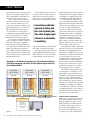
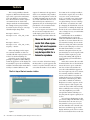
completely. Figure 6 illustrates this as
one of the text fields will overlap with
an icon if the text field is completely
filled.
Changing a few of the background
colors in a test build will often make
these issues visible. You do not want
to scatter conditionally compiled
background definitions throughout
your code. However, if all of your color definitions are arranged in one
!
!
!
!
!
Running at full speed,
it’s difficult to observe
the changes from one
tick to the next. By
freezing the clock, the
waveform can be
observed as it advances
from one sample to the
next on each press of the
return key.
header file, changing the definition of
the most common window background may show up most of the objects of interest.
BUGS VERSUS TASTE
One of the challenges of interpreting
test failures is distinguishing between
outright bugs and issues that might be
open to interpretation or taste, such as
usability issues. One tester might consider a screen to be perfect while another tester might consider it difficult
to read because of font size or difficult
to understand because of poorly
worded text. Other usability issues
such as size or position of buttons
may also be open to debate. These
subjective failures may be rejected by
developer on the grounds that the
software was still meeting its explicit
requirements.
It is important to have a process in
place that allows these issues to be resolved. The process might state that no
usability issues are to be addressed at
the test phase, or it might state that the
project leader will arbitrate if the tester
and developer cannot agree if a particular test has failed, or you could hand
all power to the tester and allow him
to fail any test where he thinks the
look of the GUI might not meet customer expectations. As long as the
process is understood by all sides, it
can avoid endless debate between developers and testers.
FIRST IMPRESSIONS,
LASTING IMPRESSIONS
Testing the visual elements of your
GUI is vital because the GUI forms
the customer’s first impression of the
product and any quality issues in the
GUI will be interpreted as quality issues for the whole product. Different
areas of software will always require
some tweaking of the test methods
employed to maximize the number of
bugs caught, and hopefully some of
the techniques shown here will help
you track down a few extra GUI bugs.
■
Niall Murphy has been designing user
interfaces for over 14 years. He is the
author of Front Panel: Designing Software for Embedded User Interfaces.
Murphy teaches and consults on building better user interfaces. He welcomes
feedback and can be reached at nmurphy@panelsoft.com. His web site is
www.panelsoft.com.
ENDNOTES:
1.
Murphy, Niall. “More on Memory Leaks,”
Embedded Systems Programming, April
2002, available on-line at www.embedded.
com/story/OEG20020321S0021
www.embedded.com | embedded systems design
| DECEMBER 2009
33