1
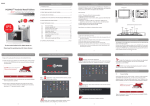
3. The software will scan the device and display its ID in the Device
List window.
4. Tap CONNECT to connect to the
device.
5. A syncing notice will show
on the screen of the techTAB.
Please note, the techTAB cannot
perform any operation until
disconnected.
6. A window will appear with nine icons, which are the nine category
folders.
7. You will notice four icons in the
bottom right of the left innerwindow; a Heart icon, a Page icon,
a Plus icon, and an X icon.
For apk files, these icons perform
Share, Move, Install, and Uninstall,
respectively. For Non-APK files these
icons perform Share, Back Up, Add,
and Delete, respectively.
46