1
Sample Program
Enter Real Time
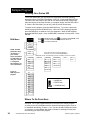
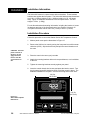
First, set the Series 922's "real time-of-day, 24-hour clock. Remember that
the MODE key is used to step through the menus. The UP/DOWN keys
are used to select parameters and values, and remain flashing until you
press the ENTER key.
1. Press the MODE key until the SETUP menu appears. Press the
ENTER key.
2. At ACCESS, select (0) with the UP/DOWN keys. Press ENTER. This
is the calibration (CALIB) menu.
3. Press the MODE key until HOUR appears in the alphanumeric display.
Note that hours are in a 24 hour format.
NOTE: When either the
hours or minutes are
entered, internal
seconds are set to 0.
4. Use the UP/DOWN keys to place hours into the display. The display
flashes until you press ENTER.
5. Press MODE to continue to the MIN parameter. Enter the correct value
for minutes and press ENTER.
6. Press the MODE key several times to return to the top of the ACCESS
(0) menu. At the ACCESS (0) prompt, which is the CALIB menu, you
see the Real Time (TI) displayed.
7. Continue to press MODE until you reach RETURN. Press ENTER to
return to SYSTEM.
Before Entering Your Program
Before we begin to program your Series 922, there are a few other initial
SETUP parameters to enter. If you haven't tried any programming since
your cold start, the C/F/U (Celcius/Fahrenheit/Units) and GS (Guaranteed
Soak) parameters are set to their appropriate values. Refer to the glossary
for a more detailed definition. If you have already tried stepping through the
parameters and entering values, it might be a good idea to go back and
double check to see that the values are correct.
NOTE: DIP Switch #2
must be OFF to access
all SPCLFUNC parameters.
1. Press the MODE key until SETUP appears. Press ENTER. Once
again you see the ACCESS parameter. Use the UP/DOWN keys to
enter (5) and press ENTER; this is the Special Function (SPCLFUNC)
menu.
2. Press MODE again until you see the C/F/U parameter. This parameter
defaults to F. Use the UP/DOWN keys to enter degrees F (Fahrenheit).
Press ENTER.
Sample Program, Chapter 3
WATLOW Series 922 User's Manual
15