1
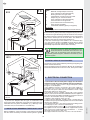
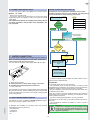
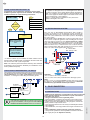
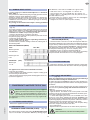
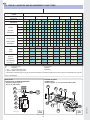
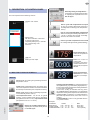
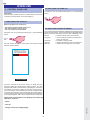
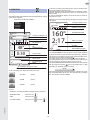
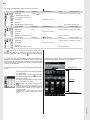
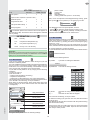
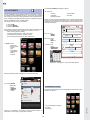
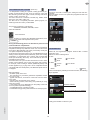
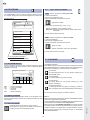
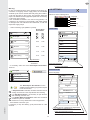
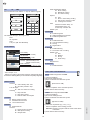
GB UTILITIES (see page 47) cycle HOT AIR COMBI STEAM x x x Injection of water in compartment x (from 10sec. to 120sec.) - - Reduced power x x x Programmed Start x x x Fan speed * 1 phase number 50% 160° 0:30 combi cycle humidity temperature (C°) cooking phase time (0 hours : 30 minutes) Also, one or more phases can be skipped during cooking; press next to phase 3 (ex. in figure) to go to this. the symbol 3 FSC (Food Safe Control) x x x Store programs x x x The Multiphase also has special phases, such as: - Pause for setting a pause between cooking cycles. - Maintaining cycle with the possibility of setting a food temperature that is kept constant for an infinite time 8 * The default speed is the maximum and never appears in the information field, whereas the others will appear if selected (half or pulsed). INFORMATION (real data) 23% humidity 175° compartment temperature (C°) 28° core probe temperature (C°) 01:58 clock (1 hour : 58 minutes) 50% 225° 0:45 4.4.2 MULTITIMER With the MultiTimer system it is possible to set a different time for each recipe (chicken, potatoes, etc.) or for each pan placed on the various levels, e.g. starting from level 1 at the top and going down to 2, 3, etc. This function also allows the oven to be used with an "à la carte" menu, where the food can be placed in the oven at the required time. To set the MultiTimer, proceed as follows: 1) open the drawer in Manual mode and press the relevant button Important When the oven is switched on after several hours of inactivity, wait 20 seconds (the time necessary for stabilisation of the LAMBDA probe) for a correct HUMIDITY reading. MultiTimer button Then press the following buttons: 4.4.1 MULTIPHASE Food can be cooked with different modes during its cycle and therefore in different phases. The oven enables programs consisting of several sequential phases (up to a max. of 15 phases). During cooking, going from one phase to the next occurs automatically, until automatic stopping of the program with completion of the last set phase. A cycle with several phases is set by carrying out the following operations: 1) switch the oven on; 2) Set for PHASE 1: - cooking mode (humidity if necessary); - compartment temperature; - cooking time (or alternatively the core probe temperature). 3) Press the "Phase" button and then the "Add new phase" button. 4) For PHASE 2 and following, set as per PHASE 1. When there are several phases, these will be listed, giving the relevant settings (an arrow will scroll the next ones which are not displayed). 2) START cycle start for setting the Multitimer START 3) MultiTimer to access the setting of times. Manual Multitimer Timer 1: Timer 3: MultiTimer --------> Timer 5: Timer 7: Timer 9: Timer 11: Timer 13: -- : --- : -- -- : -- -- : --- : -- -- : -- -- : -- Timer 2: Timer 4: Timer 6: Timer 8: Timer 10: Timer 12: Timer 14: -- : --- : -- -- : -- -- : --- : -- -- : -- -- : -- Manual Phase 50% 160° 0:30 2 3 120° 1:15 50% 225° 0:45 4 0:15 160° 48° 0:30 Add New Phase 5954 962 007 00 01 5958 0:30 Add Pause 4) Timer1 11of of12 1 1 Skip phase basket 5) --:-- Utilities (in drawer) and enter the recipe name (chicken, potatoes, etc). and enter the time with the keypad. For Timer2 and following, set as per Timer1. Pause phase To start the cooking cycle, open the oven door, load the food and close the door. The MultiTimer will start the countdown with the position having the shortest time setting. Scroll list arrow Add phase button At the end of each set cooking time the oven will sound a beep to indicate the type of food cooked. Open the door and remove the ready to serve product. Auxiliary functions Save Program The figure shows phase 1 with the following settings: 55