1
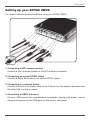
ZOTAC ZBOX 5. Connecting to a DVI or VGA display Connect one end of a DVI/VGA cable to an HDTV or monitor, and the other end to the DVI port on the system rear panel. If using a VGA connection, please use included DVI-to-VGA adapter. 6. Connecting to an HDMI display Connect one end of an HDMI cable to the HDMI port on the system rear panel and the other end to a HDMI-compatible display such as an HDTV or monitor. 7. Connecting a Bluetooth antenna module Connect a bluetooth antenna module to the bluetooth antenna connector. 8. Turning on the system Connect the supplied AC adapter to the DC IN jack on the system rear panel and then press the power switch on the front panel to turn on the system. 18 When your ZOTAC ZBOX is not in use, unplug the power adapter or switch off the AC outlet to save on power consumption.