1
AIV-4
DPI 515 User Manual
Units
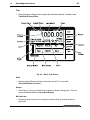
Selecting the units softkey provided access to Aeronautical or Pressure unit options.
•
Aeronautical units of either km/h, mph or knots may be selected.
•
Six user selectable pressure units may be accessed here as selected via Setup/
User/Units.
•
Using pressure units changes the display to Qc – differential pressure
Mach
Mode
•
Press the mode softkey to display a list of the aeronautical operating modes
(Altitude, Airspeed, Mach and CAS & Mach).
Set Mach
•
Appears only during Control. Press this softkey to highlight the Aim value entry box
on the Mach display. The numeric keypad may be used to input the desired Mach
setpoint. Press ENTER to confirm.
Ref Pressure
•
Sets the reference (altitude) pressure for Mach number control.
•
Barometer uses the internal barometric sensor for local atmospheric reference.
•
Value enables entry of a specific atmospheric pressure via the numeric keypad.
Go to Ground
•
Pressing this softkey option makes the instrument control the airspeed to ZERO
(Mach = 0), for safe disconnection.
Note:
Mach rate is display only and cannot be set. To view rate, 1 second or 1
minute, select the appropriate type via Airspeed/Units/Rate
K245 Issue No. 2