1
User manual
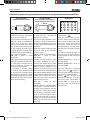
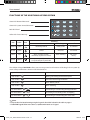
CONTROL PANEL
CONTROL KEYPAD
INSERTER FOR
CONTACT KEY
RECEIVER FOR
OPTIONAL IR INSERTER
KEY FOR CONTACT INSERTER
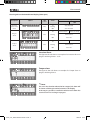
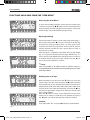
Visual signals on the Control Panel display (upper part)
Meaning
LED colour
Status
Network
presence
Green
Lit
Flashing
Off
230 V AC present
--------------No network
Battery status
Yellow
Lit
Flashing
Off
Battery run down (in the case of no network)
--------------Battery Charged (in the case of no network)
ON/OFF
Green
Lit
Flashing
Off
Sabotage
Red
Lit
Flashing
Off
Alarm
Red
Lit
Flashing
Off
Fault
Yellow
Lit
Flashing
Off
Exclusion
Yellow
Lit
Flashing
Off
At least one zone excluded
-----------------------------
-------------------------------------------
Maintenance
Yellow
Lit
Flashing
Off
-------------------------------------------
Maintenance
-----------------------------
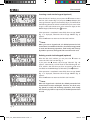
Description
Symbol
Control Panel ON
system armed
In / Out time
--------------
Control Panel OFF
--------------------------system disarmed
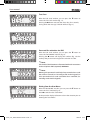
Sabotage in progress
Tamper alarm saved
No sabotage in progress
Alarm in progress
System Not Ready
Alarm Saved
No alarm
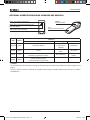
Generic fault (fuse F2 / external bus)
Fault saved
No Fault
Excluded Zones Display
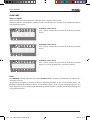
When the LED of the
icon is lit, this indicates the division of
the system, that is, the exclusion of some zones (see the example to the left).
LED lit + "E" on the display = Zone Excluded
LED off = Zone Included
4
C4UC_Uten_EXPO 24800310 08-02-10.indd 4
08/02/10 10:53