1
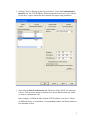
2. Clicking “Next” will bring up the Pop-up tool box. Select the Communication
Interface tab. The TCP/IP address, Subnet mask and Gateway were set as shown
for our drive. Again, consult the drive manuals for proper setup parameters.
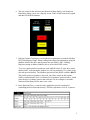
3. Next select the Host Port Extension tab. The driver for the HG4F was chosen as
a Server. This gives the option to set the devices on the Ethernet network, which
we want to communicate with.
In the example, we filled the table with the TCP/IP address of our drive. If there
are different drives, we would have a corresponding number of different addresses
to a maximum of four.
3