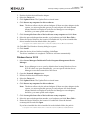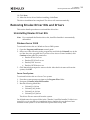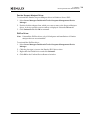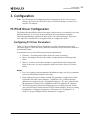
1
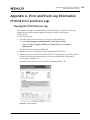
Appendix A. Error and Event Log Information
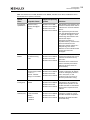
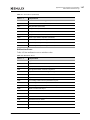
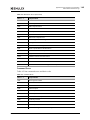
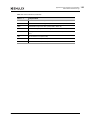
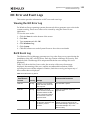
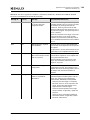
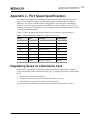
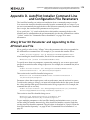
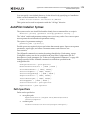
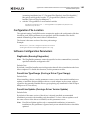
NIC Error and Event Logs
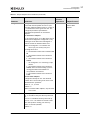
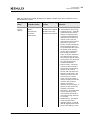
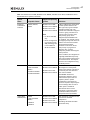
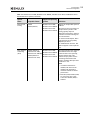
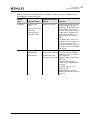
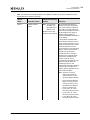
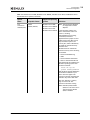
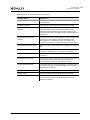
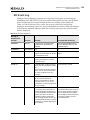
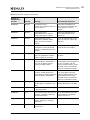
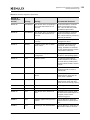
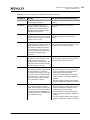
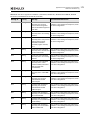
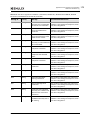
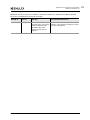
Table A-13 NIC Event Log Entries (Continued)
Message ID
Hexadecimal/
Decimal
Severity
Message
0x0002a/42
Warning
Legacy driver loaded. Move to the
NDIS 6.20 driver for Windows Server
2008 R2 for best performance.
0x0029/41
Warning
Legacy driver loaded. Move to the
NDIS 6.x driver for Windows Server
2008 for best performance.
0x0028/40
Warning
The firmware is outdated and does
not support TOE offloads for this
driver. Update the firmware.
The firmware and the driver are not
compatible versions. See the
Downloads section of the Emulex
website for compatible firmware
and drivers.
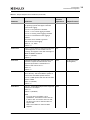
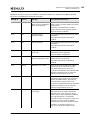
0x0026/38
Warning
The device firmware does not
support RSS functionality for this
network adapter.
The firmware and the driver are not
compatible versions. See the
Downloads section of the Emulex
website for compatible firmware
and drivers.
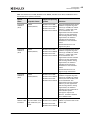
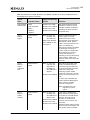
0x0025/37
Warning
The device firmware does not
support TCP offload functionality.
The firmware and the driver are not
compatible versions. See the
Downloads section of the Emulex
website for compatible firmware
and drivers.
0x0024/36
Error
The device firmware does not
support network functionality.
The firmware and the driver are not
compatible versions. See the
Downloads section of the Emulex
website for compatible firmware
and drivers.
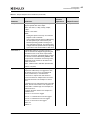
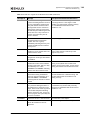
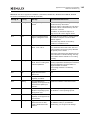
0x0023/35
Warning
The Ethernet link is down due to a
remote fault.
The Ethernet link is down due to the
remote partner signaling a fault.
Check the peer device for errors.
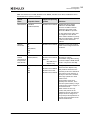
0x0022/34
Warning
The Ethernet link is down due to a
local fault.
The Ethernet link is down due to a
link-down event detected at the
driver.
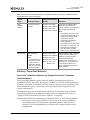
0x0021/33
Informational
Network device is operating in Gen2 For best performance, install the
mode and installed in a 4x PCIe slot. adapter in an 8x Gen2 PCIe slot.
Note: A 16x slot does not provide
any additional performance.
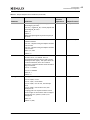
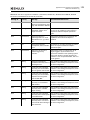
0x0020/32
Informational
The network device is operating in
Gen2 mode and installed in a 1x
PCIe slot.
For best performance, install the
adapter in an 8x Gen2 PCIe slot.
Note: A 16x slot does not provide
any additional performance.
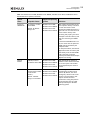
0x001f/31
Informational
The network device is operating in
Gen1 mode and installed in a 8x
PCIe slot.
For best performance, install the
adapter in an 8x Gen2 PCIe slot.
Note: A 16x slot does not provide
any additional performance.
Emulex Drivers for Windows User Manual
Recommended Resolution
P011041-01A Rev. A
158