1
6
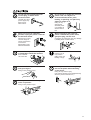
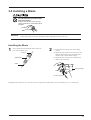
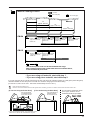
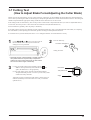
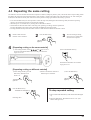
Feed out the length of
material to be cut.
7
Return the fed-out
material.
For a cut piece of material or
material whose left- or right-hand
edge is at an angle, do not place the
pinch rollers over the far ends of
the material.
Make sure that the material remains held by the pinch rollers. If the material does come loose from the pinch rollers, set it in place again.
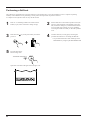
To Perform Long Cutting
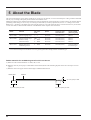
When performing cutting over a length of 1.5 m (60") or more, first feed out the required length of material. Then follow the steps below
to load the material.
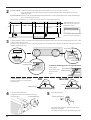
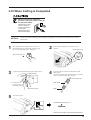
1
3
Use material that is wider by 50 mm (2") or more than
the width of the cutting to be performed.
2
Perform steps 1 through 3 of "Loading the Material".
Pull out the material from the roll and pass it through
the unit.
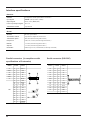
Position the pinch rollers as shown in the figure.
25 mm
(1")
or more
25 mm
(1")
or more
Guide-line marks
Guide-line marks
4
Lower the sheet loading lever.
The pinch rollers are lowered and the material is
secured in place.
Sheet loading lever
5
Press the SETUP key.
6
Feed out the length of material to be cut.
7
Return the fed-out material.
SETUP LED lights up
Make sure that the material remains held by the pinch rollers. If the material does come loose from the pinch rollers, set it in place again.
13