1
SYSTEM SETTINGS
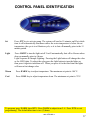
When your spa is first actuated, it will go into Priming mode, indicated by “Pr.” The Priming
mode will last for less than 5 minutes (press “Warm” or “Cool” to skip Priming Mode) and then
the spa will begin to heat the spa and maintain the water temperature in the Standard mode.
The start-up temperature is set at 100°F/37°C. The last measured temperature is constantly displayed on the LCD. Note that the last measured spa temperature displayed is current only when
the pump has been running for at least 2 minutes.
To display the set temperature, press the “Warm” or “Cool” pad once.
To change the set temperature, press the pad a second time before the LCD stops flashing. Each
press of the “Warm” or “Cool” pad will continue to either raise or lower the set temperature.
After three seconds, the LCD will stop flashing and display the current spa temperature.
Jets
Touch the “Jets” button once to turn the pump on or off, and to shift between low and high
speeds. If left running, the low speed of the pump will automatically turn off after 4 hours, and
the high speed will automatically turn off after 15 minutes.
Light
Press the “Light” button to turn the light on and off. If left on, the light automatically turns off
after 4 hours unless manually turned off prior to 4 hours.
Preset Filter Cycles
The first filter cycle begins 6 minutes after the spa is energized. The second filter cycle begins
12 hours later. Filter duration is programmable for 2, 4, 6, 8 hours or for continuous filtration
(indicated by “Filc”). The default filter time is 2 hours.
To program, press “Warm” or “Cool”, then “Jets”.
Press “Warm” or “Cool” to adjust. Press “Jets” to exit programming.
During the filter cycle, the low speed on the pump never turns off, and in Economy and Sleep
Mode, heating only occurs during the filter cycle.
1-800-STRONG-9
21