1
Newhart Systems Incorporated © 2006 All Rights Reserved
The Host Code Page option is used to select the code page that the host
computer is running in. IBM has defined a different code page for each country.
Each code page contains the necessary characters for the language. To have
the keyboard function properly, the correct host code page must be selected.
Contact your mainframe administrator to determine what code page the host
computer is using.
Hot Spots…
This menu function enables you to configure how 'hot spots' function. A “hot
spot” is a word located on the host screen that is recognized by the BLUES
Display session as having a special meaning.
When hot spots are active, they can cause commands to be sent to the host by
positioning the mouse over a portion of the host screen and pressing the left
mouse button. For example, if the word CLEAR appears on the screen, you can
perform a CLEAR key by simply pointing the mouse cursor at the word CLEAR,
and clicking the left mouse button.
The characters in the command word on the screen can be in either upper or
lower case. The following hot spot command words are supported:
PF1 through PF24, PA1, PA2, and PA3, CLEAR, ENTER, PRINT, SYSREQ, F1
through F24
In addition, any macro that has been recorded will automatically become a hot
spot.
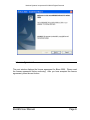
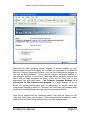
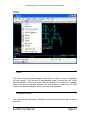
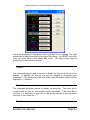
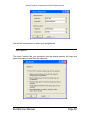
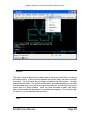
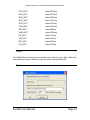
The following dialog box will be displayed when the Configure Hot Spots menu
item is selected:
BLUES User Manual
Page:48