1
Installation
Connect the DC plug of the power supply to the DC connector on the back of the clock.
Plug the power supply into a power socket. The clock is now powered on.
Please note there's no ON/OFF switch. To power off the clock remove the power supply
from the power socket and/or disconnect the DC connector from the clock.
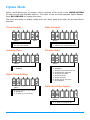
After you've powered on the clock, the clock will show the display mode.
When you power off the clock, the clock will remember all settings for approximately 30
minutes. All settings will be lost thereafter, meaning you'll have to set up again after
powering on the clock.
Control Panel
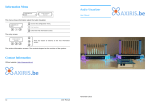
Turn the knob LED to control the brightness of the background lightning. The brightness
varies from no light at all to maximal intensity.
The meaning of the buttons MODE/OPTION, SET/ALARM and ADJ/SNOOZE depends
on the clock's current mode.
You can operate the buttons MODE/OPTION and SET/ALARM in two ways:
▪
Push briefly: Push the button and release immediately. This operation is called
pushing the button.
▪
Hold: Push the button for at least one second and release afterwards. This operation
is called holding the button.
User Manual
3